The Complete Guide to Measuring PD at Home
Buying glasses online can save you hundreds of dollars compared to retail optical stores. However, there is one crucial number often missing from your eye doctor's prescription: the Pupillary Distance (PD). Without this exact millimeter measurement, the optical center of your lenses will not align with your eyes, leading to headaches, eye strain, and blurred vision.
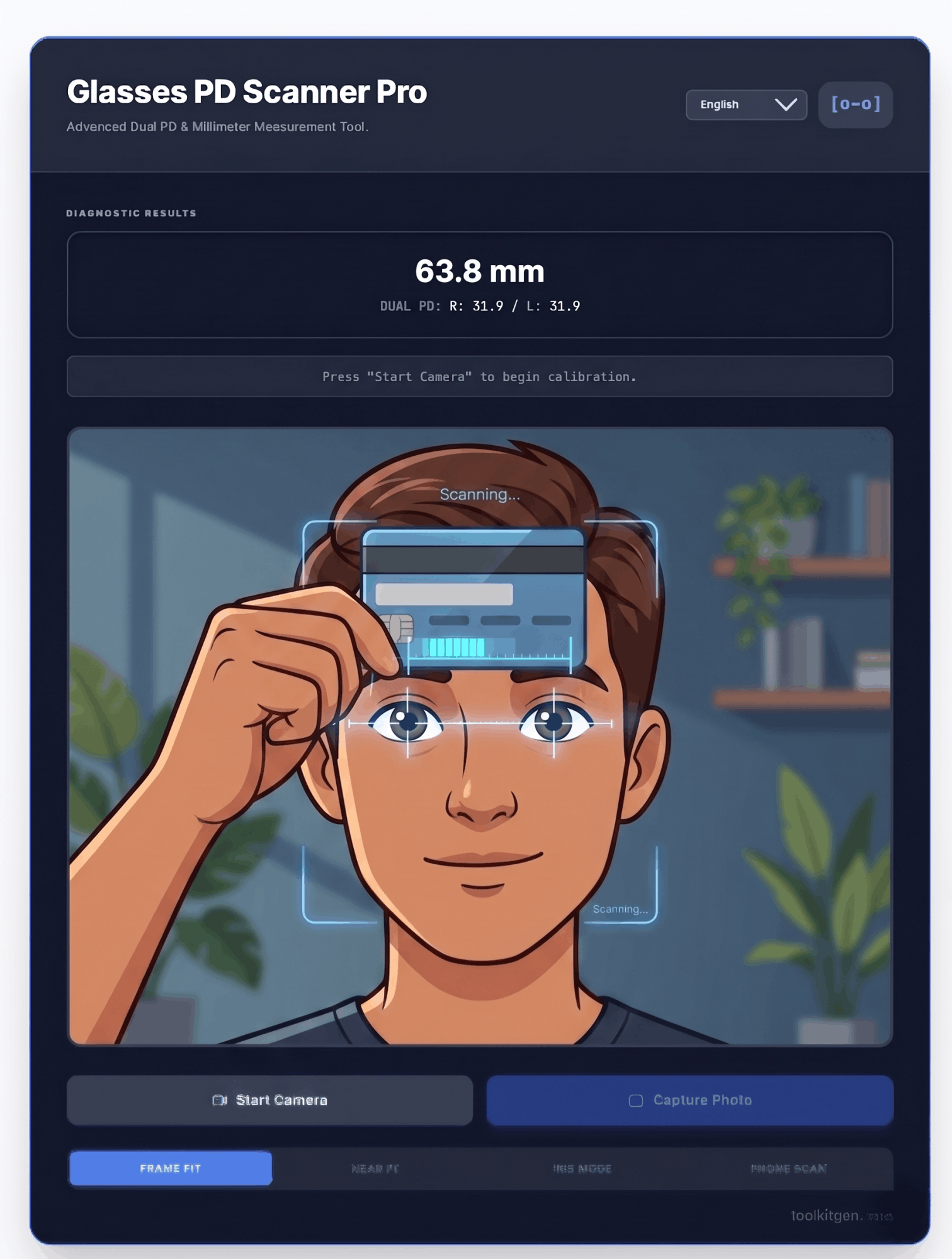
Our free PD Scanner Pro uses standard card-scaling computer vision and a digital loupe to provide a highly accurate millimeter measurement instantly—without downloading any sketchy apps.
How to Measure Your PD Online (Step-by-Step Guide)
Using our browser-based tool is incredibly simple. All you need is a computer or smartphone with a camera and any standard-sized plastic card (like a credit card or library card).
- Prepare Your Lighting: Sit in a well-lit room. Avoid having a bright window directly behind you, as backlighting will cast your face in shadow.
- Get Your Reference Card: Grab a standard magnetic strip card. Privacy Tip: Always place the back of the card against your forehead so no sensitive information is visible on camera.
- Position the Card: Click "Start Camera". Hold the card perfectly flat against your forehead, just above your eyebrows. Ensure it is perfectly horizontal.
- Capture the Image: Look directly into the camera lens (not at the screen itself) to ensure your eyes are focused straight ahead. Click "Capture Photo".
- Marking the 5 Calibration Points: Our tool will activate a 3x digital magnifying
loupe. You will be prompted to click five precise locations on your photo:
- 1 Click the absolute Left Edge of the card.
- 2 Click the absolute Right Edge of the card.
- 3 Click the exact center of your Nose Bridge.
- 4 Click the center of your Left Pupil (the eye on the left side of the photo).
- 5 Click the center of your Right Pupil.
The Physics of Card Scaling
How does the camera know real-world measurements? A standard ID-1 card is universally manufactured to be exactly 85.60 millimeters wide. By identifying the left and right edges of the card in your photo, our algorithm calculates the precise pixel-to-millimeter ratio. It then applies that mathematical scale to the distance between your pupils.
What is Pupillary Distance (PD)?
Pupillary Distance is the exact distance between the centers of your two pupils. It is measured in millimeters (mm). When a lab cuts your prescription lenses, they place the "optical center" (the sharpest part of the prescription) perfectly in the middle. If this center doesn't match your physical PD, you will experience a "prism effect," making your eyes work overtime to correct the distorted light.
Single PD vs. Dual PD (Monocular)
- Single PD (Binocular): The total horizontal distance from one pupil to the other (e.g., 64mm). This is completely fine for standard, single-vision reading or distance glasses.
- Dual PD (Monocular): The distance from the center of your nose bridge to each pupil individually (e.g., 32mm Left / 32.5mm Right). Human faces are rarely perfectly symmetrical. Dual PD is absolutely essential if you are ordering progressive lenses or have a very high prescription.
- Near PD vs. Far PD: Your eyes rotate inwards (converge) when you read a book. Therefore, your "Near PD" is usually about 3mm narrower than your "Far PD". Use your Far PD for everyday glasses, and subtract 3mm if you are ordering dedicated reading glasses.
| Measurement Type | Average Adult Range | Average Child Range |
|---|---|---|
| Total PD (Binocular) | 54mm - 74mm | 43mm - 58mm |
| Dual PD (Monocular) | 27mm - 37mm | 21mm - 29mm |
Troubleshooting: Why Your Result Might Be Wrong
While our digital loupe helps ensure pixel-perfect clicking, optical user error can still occur. If you get a result that seems too narrow (below 50mm) or too wide (above 75mm), check for these common mistakes:
1. Camera Distance (Fisheye Distortion)
Sit approximately arm's length (roughly 60cm or 2 feet) away from the camera. Being too close to a laptop webcam causes a "fisheye" wide-angle distortion, which artificially stretches your facial features relative to the flat card.
2. Card Tilt
Ensure the card is perfectly horizontal and flat against your forehead. If the card is tilted backward or angled sideways, the camera sees a narrower 2D projection of the card. The software will think the card is smaller than it is, artificially inflating your PD measurement.
3. Looking at the Screen Instead of the Lens
A very common mistake is looking at your own eyes on the screen while capturing the photo. This causes your eyes to converge slightly inwards (entering Near PD mode). Always look directly at the physical glass circle of the webcam lens to simulate looking at "infinity" (Far PD).
Medical & Accuracy Disclaimer
This tool is intended for informational purposes and to assist in purchasing standard, single-vision non-prescription or low-prescription eyewear online. It is not a substitute for professional medical advice, diagnosis, or clinical optometry equipment (like a corneal reflex pupillometer). If you have a complex prescription, high astigmatism, or require progressive/bifocal lenses, we strongly advise having your PD measured by a licensed eye care professional.
Why Your PD Matters for Online Eyeglass Shopping
Understanding your pupillary distance is essential when purchasing prescription glasses or sunglasses online. Many online eyewear retailers require this specific measurement to properly position your lenses. Without accurate PD measurements, even the highest quality prescription lenses can cause visual discomfort, headaches, and compromised vision clarity.
The average adult pupillary distance ranges from 54mm to 74mm, with most adults falling between 58mm and 68mm. Children typically have smaller measurements, ranging from 43mm to 58mm. Knowing your precise measurement helps ensure that the optical center of your lenses aligns perfectly with your pupils, which is critical for optimal vision correction.
Understanding Frame Width and PD Compatibility
When shopping for eyeglass frames, the total width of the frame should complement your pupillary distance. The ideal frame width is typically your PD plus 30-40mm. For example, if your PD is 63mm, look for frames with a total width between 130mm and 140mm. This calculation ensures comfortable fit and proper lens positioning.
Frames that are too narrow for your PD can cause your eyes to look toward the center of the lenses, leading to distorted vision through the periphery. Conversely, frames that are too wide may cause the lenses to sit too far from your eyes, affecting the optical prescription effectiveness.
Single Vision vs. Progressive Lenses and PD
Single vision lenses correct vision at one distance and require a straightforward PD measurement. However, progressive lenses, which provide correction for multiple distances, demand more precision in PD measurement. The horizontal positioning of the near vision zone in progressive lenses depends heavily on accurate PD readings.
For progressive lens wearers, an incorrect PD can result in a narrow field of clear vision, requiring head movement to see clearly through different parts of the lens. Our dual PD measurement feature specifically addresses this need by providing individual measurements for each eye.
Computer Glasses and Digital Eye Strain
With increased screen time from computers, tablets, and smartphones, computer glasses have become essential for many workers. These specialized lenses typically require a "computer PD" that accounts for the typical viewing distance of 50-70cm. This measurement is usually 3-5mm narrower than your distance PD.
Our near PD calculator helps you determine the correct measurement for computer glasses, reducing digital eye strain, neck pain, and headaches associated with prolonged screen use. By adjusting the working distance slider, you can calculate the optimal PD for your specific workstation setup.
Reading Glasses and Near Vision Correction
Presbyopia, a natural age-related condition affecting near vision, typically begins around age 40. Reading glasses require an even narrower PD than distance glasses due to the close proximity of reading material. The typical reading distance is 35-40cm, requiring a PD approximately 5mm narrower than your distance measurement.
When ordering dedicated reading glasses online, use our near PD calculator to determine the appropriate measurement for your typical reading distance. This ensures comfortable reading sessions without the neck strain caused by tilting your head to find the optimal viewing angle.
The Science Behind Digital Loupe Technology
Our digital loupe magnifies the captured image by 3x, allowing you to click with precision on the exact points needed for accurate measurement. This pixel-level accuracy is crucial because even a 1mm error in PD measurement can cause noticeable visual distortion in prescription lenses.
The algorithm uses the standard ID-1 card dimensions (85.60mm) as a reference scale. By calculating the pixel-to-millimeter ratio from your card edge clicks, we can accurately translate the pixel distance between your pupils into real-world millimeters.
How to Interpret Your PD Measurement Results
After using our tool, you will receive three key measurements: your total/binocular PD, your left monocular PD, and your right monocular PD. The total PD is the sum of your left and right monocular measurements and represents the full distance between your pupils.
Most optical labs accept either your total PD or monocular measurements for single vision lenses. However, progressive lenses, high prescriptions, and prism corrections almost always require monocular PD measurements for optimal visual outcomes.
Common PD Measurement Myths Debunked
Myth 1: "I can just use an average PD." While 63mm is a common average, individual PDs can range from 54mm to 74mm. Using an incorrect average can lead to significant vision problems, especially with higher prescriptions.
Myth 2: "My old glasses have my PD on them." Many optical labs do not print PD on the prescription itself. When available, the measurement is often for reference only and may not be your current measurement.
Myth 3: "I don't need PD for non-prescription glasses." Even plano (non-prescription) sunglasses and blue light glasses benefit from proper PD alignment for comfort and visual clarity.
Mobile-Friendly PD Measurement Tips
While our tool works on mobile devices, capturing a proper selfie for PD measurement requires attention to lighting, distance, and positioning. Use natural, diffused lighting from in front of you rather than behind. Hold the device at arm's length and ensure your entire face and forehead are visible in the frame.
The rear-facing camera on smartphones typically provides better image quality for PD measurement than front-facing cameras. Consider using a mirror or having someone else take the photo to use the rear camera while maintaining proper positioning.
Privacy and Security When Measuring PD Online
Our PD measurement tool processes all images locally within your browser. No facial data is transmitted to external servers, stored in databases, or shared with third parties. The mathematical calculations happen entirely on your device using client-side JavaScript.
This privacy-first approach means you can safely measure your PD without concerns about biometric data security. Your image never leaves your device, and once you close the browser tab, all temporary data is cleared.
When to Visit an Eye Care Professional
While our online tool provides accurate measurements for most users, certain situations require professional measurement. High prescriptions (above +/- 4.00 diopters), prism corrections, complex astigmatism, and progressive lens fitting all benefit from clinical measurement techniques.
Additionally, if you experience persistent headaches, eye strain, or visual discomfort despite using the correct prescription and PD, consult an optometrist or ophthalmologist. These symptoms may indicate underlying vision conditions that require professional evaluation.
Understanding Frame Sizes and PD
Frame sizes are typically listed as three numbers (e.g., 50-18-145) representing lens width, bridge width, and temple length. The lens width is the most relevant for PD compatibility. Divide your total PD by two and add 2-3mm per side to determine the minimum lens width for your face.
For example, with a PD of 64mm, each eye requires 32mm of lens width. Adding 2mm for frame padding means you should look for frames with lenses at least 34mm wide. Oversized frames may require additional lens width calculations.
International PD Standards and Measurements
Pupillary distance is measured in millimeters globally, making it a universal measurement for ordering eyeglasses internationally. Whether purchasing from a domestic or international online retailer, your PD in millimeters remains constant.
Some regions use "Farcical PD" measured from the outer edge of one eye to the inner edge of the other, but this measurement is less common and typically only used by specific optical labs. Always confirm which PD format your retailer requires before ordering.
Seasonal Trends in Online Eyewear Shopping
Many consumers discover the need for PD measurement during peak shopping seasons when searching for affordable eyewear deals. Black Friday, Cyber Monday, and holiday sales drive significant traffic to online optical retailers, many of whom require PD information at checkout.
Having your PD measurement ready before these sales begin ensures a smoother purchasing experience and helps you take advantage of time-limited discounts without delays.
Environmental Impact of Online Eyewear
By purchasing glasses online with accurate PD measurements, you contribute to environmental sustainability. Online eyewear ordering reduces transportation emissions from retail store supply chains and minimizes packaging waste from traditional optical retail environments.
Many online eyewear retailers also participate in recycling programs for old glasses, further reducing the environmental footprint of purchasing prescription eyewear.
How to Store and Share Your PD Measurement
After measuring your PD, save the results for future reference. Our PDF download feature creates a professional report that includes your measurement, date, and helpful buying guidance. Keep this document in your email or cloud storage for easy access when ordering new glasses.
Consider sharing your PD with family members who may also need glasses. This is especially helpful for parents ordering children's eyewear or adults helping elderly relatives with online optical purchases.
Comparing Online vs. Retail PD Measurement
Traditional optical stores measure PD using a pupillometer or ruler-based technique. While these methods are generally accurate, they depend on technician skill and may not account for specific frame fit requirements. Online measurement with our tool allows you to measure multiple times for verification.
The convenience of home measurement, combined with the ability to take multiple readings and calculate averages, often produces results comparable to professional optical measurements for standard prescriptions.