How to Safely Check Who Unfollowed You on Social Media (Free Tool)
We have all been there: your follower count drops, and you are left wondering, "Who unfollowed me?" For years, the only way to find out was to download shady "Follower Tracker" apps on your phone. Unfortunately, those apps require your username and password, putting your account privacy at major risk.
Welcome to the best alternative. The Free Follower Checker on this page is a powerful, privacy-first tool that runs completely inside your browser. By using the official data file provided directly by your social media app, you can easily see your audience overlap, discover secret fans, and find out exactly who isn't following you back—all without ever logging in!
Why Your Follower Ratio Matters
Having a clean, organized friend list isn't just about popularity; it is about creating a positive online environment and a healthier social media life. Understanding who interacts with you helps in a few major ways:
The Follower-to-Following Balance
Your social media health can often be seen by looking at your mutual friends versus the people who do not engage with you. When you follow hundreds of accounts that do not follow you back or interact with you, your feed becomes cluttered with content you might not even care about. Cleaning up this list improves what you see every day!
Why You Should Never Use Fake Follower Tracker Apps
If you search the app store, you will find dozens of apps claiming to show you who viewed your profile or who unfollowed you. However, social media platforms strongly advise against using them for several important safety reasons:
- Account Privacy Risks: When you type your password into an unofficial app, you are giving a random company full access to your personal messages, photos, and personal info.
- Reduced Visibility: Social apps have smart security systems. If they notice you logging into a random tracker app, they might think your account was compromised. To protect you, they might hide your posts from your friends or the explore page temporarily.
- Locked Accounts: Using these apps often leads to getting locked out. You might be forced to change your password or verify your phone number to prove you are human.
Our Safe Alternative
Because this tool uses the official data file you download yourself, you never have to type in a password. Your account remains 100% safe, and your information stays completely private on your own device.
Step-by-Step: How to Get Your Official Data File
Social media platforms allow you to download a copy of all your profile information. Here is the fast, easy way to get the exact file you need to use this tool:
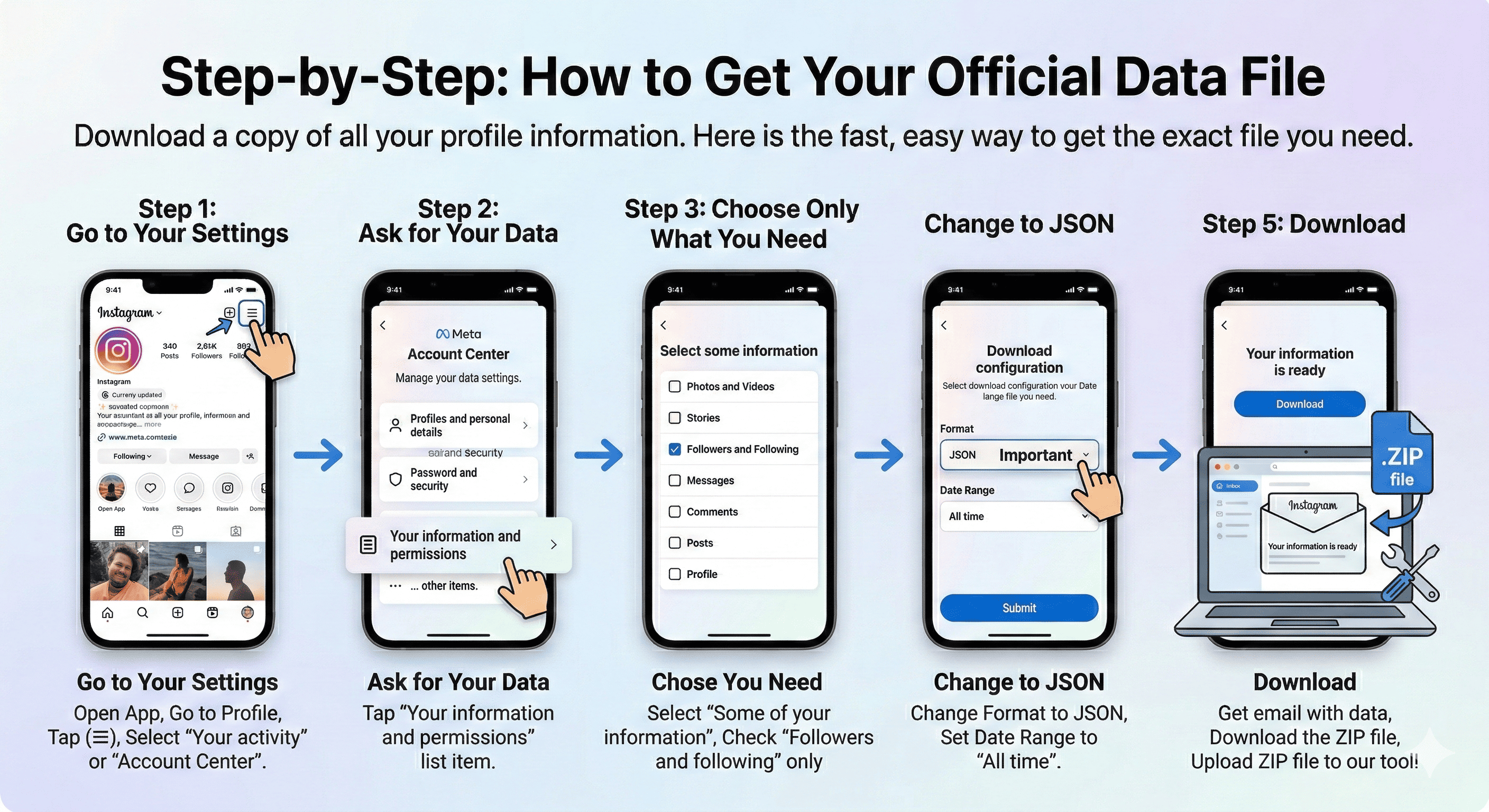
- Go to Your Settings: Open your app, go to your profile page, tap the menu icon (the three lines), and select Accounts Center.
- Export Your Information: Tap on Your information and permissions, then select Export your information. Tap Create export and choose Export to device.
- Choose Only What You Need: To make the download super fast, don't download your photos or messages. Select "Some of your information" and only check the box for "Followers and following".
- Important - Change to JSON: Before you finish, look for the "Format" option. It usually defaults to HTML. You must change it to JSON. Make sure the date range is set to "All time".
- Download: You will get an email when your file is ready. Download the ZIP file to your phone or computer. Then, simply upload that ZIP file right here into our tool!
Understanding Your Instagram Friend List
Once you use our tracker, it sorts everyone into three easy-to-understand categories. Here is what each list means for your profile:
1. Mutual Friends (The Best List)
These are the people you follow who are awesome enough to follow you back! This is your true online community. Engaging with these people by liking and commenting on their posts is the best way to have fun online and boost your profile's organic reach.
2. People Who Don't Follow Back (Time to Unfollow?)
This is the list you are probably here for. These are accounts you follow, but they do not follow you. Sure, it makes sense to follow celebrities, athletes, and meme pages without expecting a follow back. But if you see normal people from your town or old acquaintances on this list, it might be time to hit the "unfollow" button and clean up your feed!
3. Your Secret Fans
These are accounts that choose to follow you, even though you haven't followed them back. If you are a creator or a business, this is your fan base! It is always fun to look through this list to see who enjoys your content.
Digital Wellbeing: Why Cleaning Your Feed Feels Great
It is easy to get overwhelmed when scrolling on your phone. Every single account you follow takes up a tiny bit of your attention every day. The idea of "Digital Pruning"—which simply means unfollowing accounts that no longer make you happy—is a great way to protect your mental health.
By using this free follower checker, you get a clear look at where your attention is going. Unfollowing inactive accounts, people you don't talk to anymore, or pages that just post negative news can make opening your app a much happier experience. The goal isn't just to get a high follower number; it's to create a fun, positive space for yourself.
How Does This Free Tool Work Without a Password?
If we don't ask for your password, how do we know who unfollowed you? It's simple: we use a technology called JSON reading.
When you give the app your downloaded ZIP file, your own web browser (like Chrome or Safari) opens the folder locally. It finds the list of "People You Follow" and compares it to "People Following You". It does the math instantly right there on your screen. Because this all happens on your own phone or computer, the data never travels across the internet to us. It is completely safe, private, and leaves zero trace once you close the page.
| List Type | What It Means | What You Should Do |
|---|---|---|
| Mutuals | True Friends | Like and comment on their posts to keep the friendship strong! |
| Not Following Back | Feed Clutter | Check the list. If they aren't a celebrity, consider unfollowing them. |
| Secret Fans | Your Supporters | Check their profiles; you might find someone cool to follow back. |
Frequently Asked Questions
Does this work on an iPhone or Android?
I have multiple files like followers_1.json and followers_2.json. Is that okay?
Can I trust this website? Are you saving my friend list?
Now that I have my list, can I unfollow 500 people at once?
Ready to Clean Up Your Feed?
Stop wondering who stopped following you. Use our free, safe tool right now to check your lists instantly without any privacy risks.